iPhone voice recorder
Voice recorder with transcription for iPhone
DictaWiz records on your iPhone and turns the recording into a transcript you can read, search and share. It labels who said what, writes a summary with the decisions and action items, and does the transcription on the phone itself.
Use it for meetings, lectures, interviews and voice notes. Already have recordings in Voice Memos? Send them to DictaWiz and get the same transcript.
What you get from one recording
A full transcript
Punctuated text with timestamps. Playback highlights each word as it is spoken, so you can check a line against the audio.
Speaker labels
Turn on speaker labels and DictaWiz marks each voice in the transcript, so you can tell the interviewer from the guest.
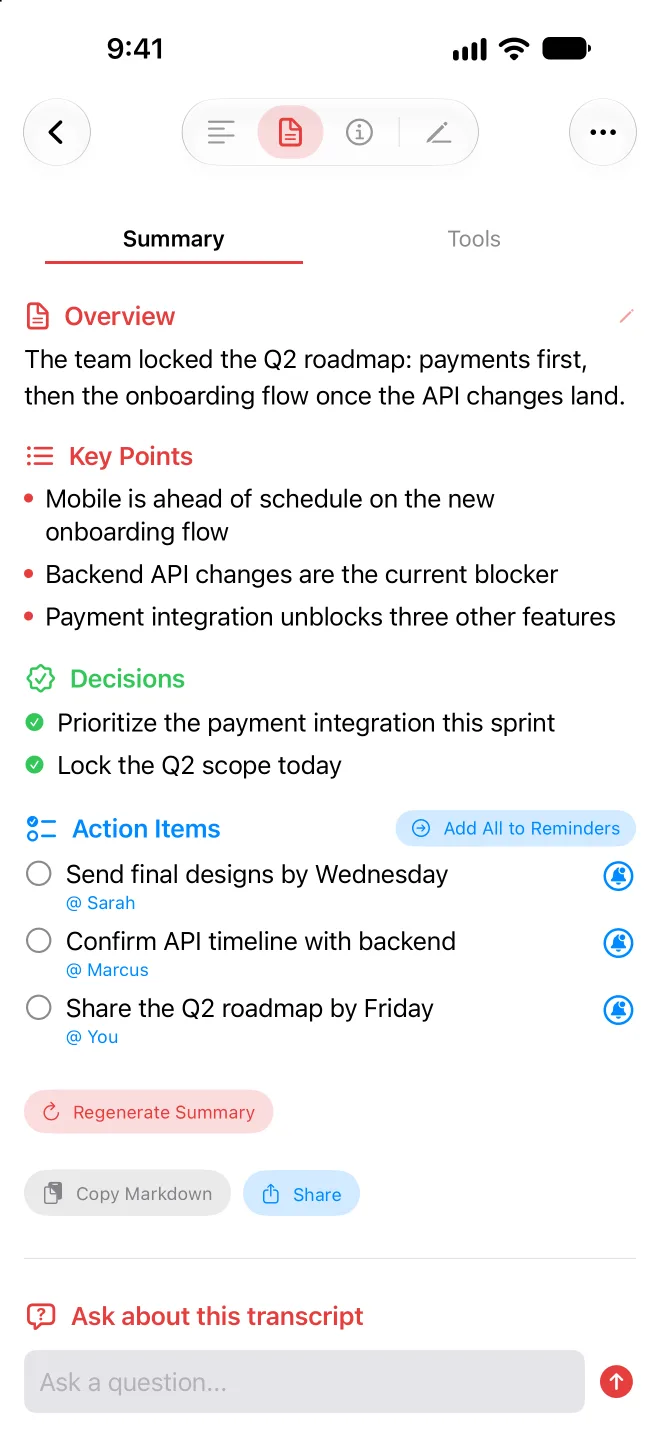
A summary
Key points, decisions and action items, written by the AI model on your phone.
Answers about the recording
Ask a question in plain words, like "What did we agree on the budget?", and get an answer from that transcript.
Study tools for lectures
Make flashcards, a quiz or a mind map from a class recording.
Start recording in one step
Action button and Control Center
Assign DictaWiz to the Action button, or add its control to Control Center, and start recording without unlocking.
Siri
Ask Siri to start a DictaWiz recording.
Lock Screen and Dynamic Island
A Live Activity shows the recording while you use other apps or lock the phone. Pause and resume whenever you need to.
Apple Watch
Start and pause a recording on your wrist. The recording lands on your iPhone for transcription.
Transcribed on your iPhone
DictaWiz ships three speech engines that run on the phone. Pick one in Settings, or per recording.
Parakeet
Fast transcription in 25 European languages.
Whisper
99 languages, all on the device.
Apple's speech engine
Built into iOS, with no monthly limit in DictaWiz.
The recording and the transcript stay on your iPhone. If you turn on iCloud sync, they also go to your own iCloud account so they show up in the DictaWiz Mac app. DictaWiz runs no server that stores your audio. Prefer a cloud model? With a paid plan, add your own API key for OpenAI, Groq or a custom endpoint, and your provider bills you directly.
Add names and terms to your custom words list once, and DictaWiz uses them when it transcribes, so a colleague's name or a drug name comes out spelled right.
How to transcribe Voice Memos on iPhone
DictaWiz picks up recordings you made in Apple's Voice Memos app through the share sheet.
- 1Install DictaWiz from the App Store.
- 2Open Voice Memos and tap the recording you want transcribed.
- 3Tap the more button (three dots), then Share.
- 4Pick DictaWiz in the row of apps. If you don't see it, swipe to the end of the row, tap More, and turn DictaWiz on.
- 5DictaWiz imports the memo. Turn on speaker labels if more than one person talks, then tap Transcribe. The transcription runs on your iPhone with the engine you picked in Settings.
The memo stays in Voice Memos as well. Once it is in DictaWiz, it gets the same summary, speaker labels and export options as a recording you made in the app.
Import recordings from anywhere else
From Files
Tap the plus button, then Import Audio File. DictaWiz reads WAV, MP3, M4A, AAC, AIFF, OGG and FLAC.
From other apps
Share an audio file to DictaWiz from Mail, Messages, a recorder app or a cloud drive. The share sheet also takes CAF, Opus and WMA files.
From a link
Paste a direct link to an audio file with Import from URL. Links to YouTube and streaming sites don't work, because they don't point at an audio file.
Send the transcript where you work
Export a transcript as Markdown, plain text, timestamped text, PDF, or SRT and WebVTT subtitles. Or send it straight to Notion, Obsidian, Bear, Craft, Drafts, UpNote, TickTick or Apple Notes, or to your own webhook. On the free plan, copy or share the transcript text. File exports and the app integrations come with a paid plan.
What it costs
DictaWiz is free to download and try. Dictation with Apple's on-device speech engine has no limit. Parakeet and Whisper transcription, summaries, speaker labels, study tools and the keyboard's AI actions come with a monthly free allowance. A subscription or a one-time lifetime unlock removes those limits.
The same app is also a voice keyboard: dictate into Messages, Mail or any other app. See the keyboard tips or the Otter alternatives if you are comparing meeting recorders.
Voice recorder questions
- Can I transcribe Voice Memos on my iPhone?
- Yes. Open the recording in Voice Memos, tap Share, and pick DictaWiz. DictaWiz imports the audio and transcribes it on your iPhone. You can also save the memo to Files and import it from the plus button in DictaWiz.
- Which audio files can DictaWiz transcribe?
- From Files: WAV, MP3, M4A, AAC (MPEG-4 audio), AIFF, OGG and FLAC. The share sheet also accepts CAF, Opus and WMA. You can paste a direct link to an audio file as well. YouTube and streaming links don't work.
- Does the transcription happen on my phone?
- Yes, by default. Parakeet, Whisper and Apple's speech engine all run on the iPhone, so recordings stay on the device and transcription works in Airplane Mode once the model is downloaded. Audio goes to a cloud service only if you add your own API key for one (a paid-plan option).
- Does it label who is speaking?
- Yes. Turn on speaker labels for a recording and DictaWiz marks each speaker in the transcript. The free plan includes three speaker-labeled recordings a month.
- Can it record with the screen locked?
- Yes. Recording keeps going when you lock the phone or switch apps, and a Live Activity on the Lock Screen and in the Dynamic Island shows that it is running. You can pause and resume.
- Which languages does it transcribe?
- Whisper covers 99 languages on the device. Parakeet covers 25 European languages. Pick the engine and language in Settings.
- Is the voice recorder free?
- DictaWiz is free to download and try. Dictation with Apple's on-device speech engine has no limit. Parakeet and Whisper transcription, summaries, speaker labels, study tools and the keyboard's AI actions come with a monthly free allowance. A subscription or a one-time lifetime unlock removes those limits.
Record your next meeting with DictaWiz
Free to try. Transcribed on your iPhone.